
Updated UI, bug fixes and permission tweaks in v2.01
Version: 2.01
Release Date: 1st November 2023
Bug fixes in 2.01
Table is not complete and broken
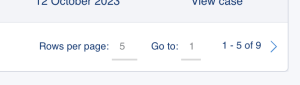
All tables in the Partner Portal have been recoded to use an updated pagination system as well as improved search and filter
Slow sign in
Many dealers commented that they were getting long sign in waits while the system fetched their data. As part of a UI redevelopment, the system now waits until the user requests the company data. TRhis speeds up sign i as well as allowing cases or upgrades to be created without the need to wait for date.
Selecting acccount users goes to blank screen
The account management section has now been split into individual pages allowing for better navigation over the tabs
Portal permissions
Bug fixed in setting users access permission to both Partner Portal and Marketing Portal.
Contacts email address removed when enabled on Partner Portal
Bug fixed in users account email removing when updating an account
Delete user
Fixed bug when deleting a user from the account
Access Permissions
Slight permission changes have been made to what each user level can access
| Support | Sales | Admin | |
|---|---|---|---|
| Printers Dashboard |
|
|
|
| Individual printer |
|
|
|
| Upgrades Dashboard |
|
|
|
| HoloKotes Dashboard |
|
|
|
| Leads Dashboard |
|
|
|
| Case Dashboard |
|
|
|
| My Account |
|
|
|
New Dashboard UI
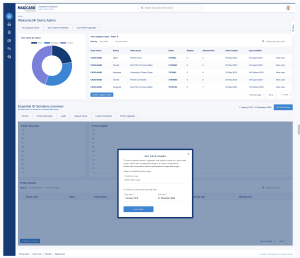
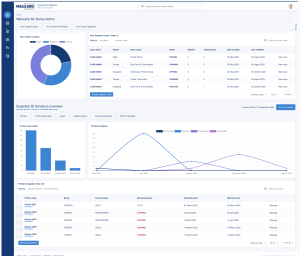
Inline with the adjustments to the user permissions and to better facilitate faster logins, the main portal dashboard have been redesigned.
 |
 |
|---|---|
User Datathe user data is presented an both graph and tabled format. if there are multiple dashboards on a page such as the home page, these are available by clicking the relevant tab. All tables are filterable and searchable, clicking on the grah will also allow the user to quickly filter the table data. Company DataWhen a user logs into the system and has permissions to see company data on a dashboard, the date range modal will automatically lauch allowing the user to set a date range and retrieve the data. |
Date range SetAfter choosing a date range, the system will go and fetch the data from Magicard. All company dashboard charts and tables will be updated automatically. the date range can be changes at any time by clicking “Set Date Range”. If the system cannot find any data for a section for a given date range, the charts and tables will alert you. |
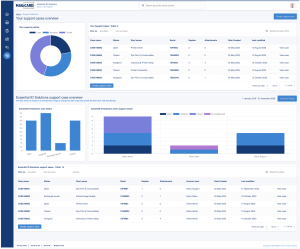
Example Support Dashboard
Main menu
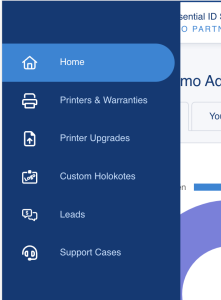 In version 2.01 we have broken out the different features into their own dashboard. This makes it easier for users to get to the correct data quicker. The options on the main menu will be dependent on your permissions and which features Magicard have selected for your account.
Home – the home page contains a dashboard of all data and features based on the sign in permissions. The page is split between user data and company data if the users permissions has access to this data. each feature is available by clicking the appropriate tabs.
Printers and warranties – this dashboard gives you access to the shipped printers and warranty data for your company
Printer upgrades – this dashboard contains all data for user upgrades and this data is not based on a date range. The company data is based on a date range and is available if the user has the correct permissions.
Custom HoloKotes – this dashboard contains all data for user custom HoloKotes and this data is not based on a date range. The company data is based on a date range and is available if the user has the correct permissions.
Leads – this dashboard is available to companies that have this feature from Magicard and allows the management and updating of any lead sent from magicard.com.
Support cases – this dashboard contains all data for user support cases and this data is not based on a date range. The company data is based on a date range and is available if the user has the correct permissions.
Date range
A few dealers commented the difficulty in setting a date range to request date. In version 2.01 we have put in place a date picker modal where you can quickly set a custom start and end date or quickly select from a predefined periods.